Enigma for Thunderbird — mail assistant
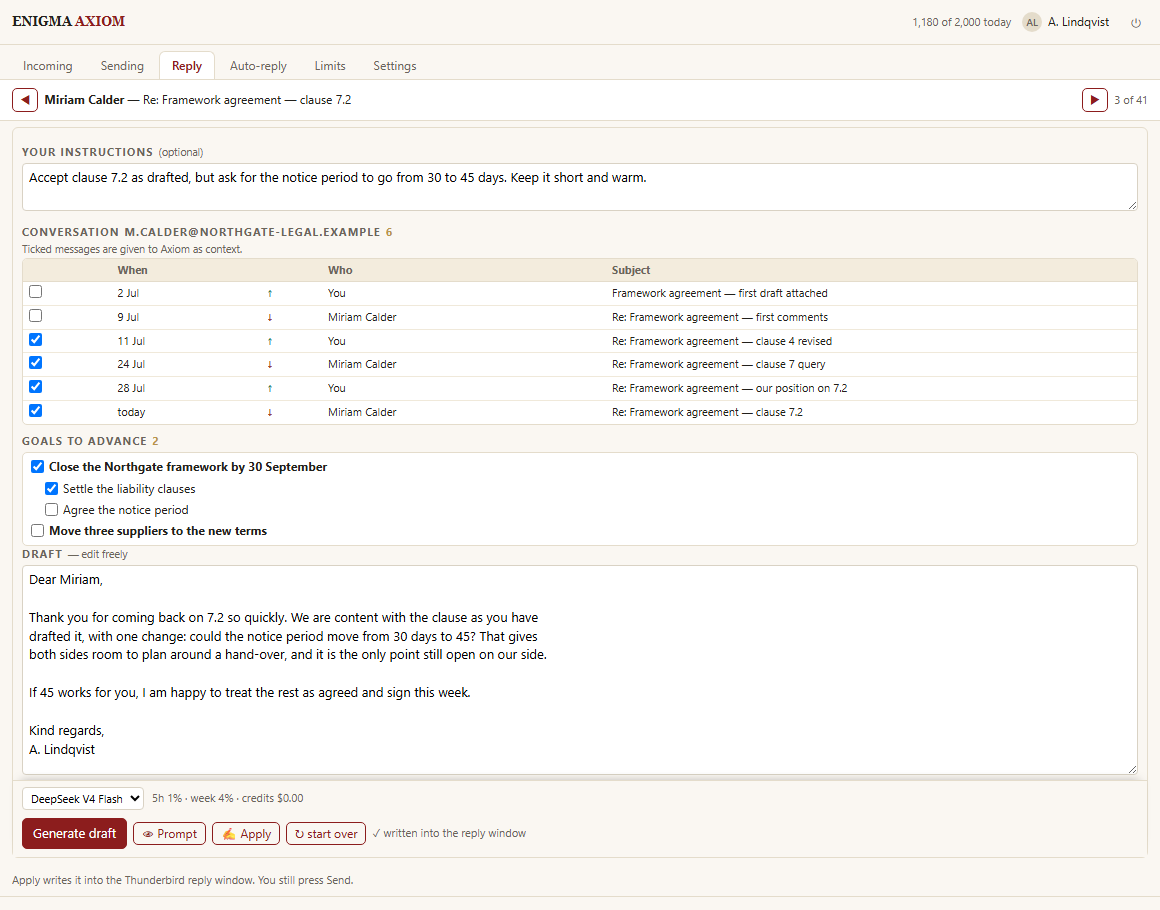
It writes the reply, then gets out of the way.
Axiom opens Thunderbird's ordinary compose window with a draft already in it — written from the message you are answering, the earlier letters in that correspondence, your own notes and, if you choose, the goals you are working towards. You edit it like any other draft and you press Send.
WHAT IT DOES
Drafts, in the real compose window. Not a chat box beside your mail. The draft lands in Thunderbird's own editor, above the quoted original, ready to change.
Triage. What arrived, ordered by what actually needs answering, one line of summary each — and the reason beside anything it would not touch.
Automatic replies, when you say so. Off until you turn them on and choose whom they apply to. Everything sent is listed, with the time and the text, and can be stopped while it waits.
Your own copy of what went out. Some providers keep no copy of a message sent through them. Axiom keeps one on your computer, with a checksum you can compare against your Sent folder.
A sign-off per language, a model you pick, and a running count of what you have used.
YOU DO NOT HAVE THUNDERBIRD YET?
Thunderbird is a free, open-source mail program from the makers of Firefox. It runs on your own computer and connects to the mailboxes you already have — Gmail, Outlook, iCloud, your company server — and keeps them in one place, offline, with no advertising and nobody reading your mail to sell you things. It is the client this add-on lives inside, and setting it up takes about twenty minutes.
- Download it from https://www.thunderbird.net — 79 MB on Windows, 147 MB on macOS, and a tarball or Flatpak on Linux. On macOS drag it to Applications and then eject the disk image, or you will keep running it from the image.
- Add your mailbox. Thunderbird asks for your name, address and password and configures the rest itself for most providers. From Thunderbird 153 the sign-in for Google, Microsoft, Yahoo and Yandex opens in your default browser — be signed into the right account there first.
- Two things catch people: on iCloud you need an app-specific password from account.apple.com, and on Yandex you must switch IMAP on in the mailbox settings before any sign-in method works. Gmail needs nothing switched on — IMAP has been permanently enabled since January 2025.
- Then install this add-on with the button at the top of this page, or from inside Thunderbird: the ≡ button to the right of the search bar → Add-ons and Themes → Extensions → search for ENIGMA Axiom. On Windows and Linux the menu bar is hidden, so guides that say "Tools → Add-ons" only work after you press Alt.
- Open the add-on and press Connect ENIGMA. It shows a short code and opens enigma.ist; sign in, approve the code, and the connection renews itself from then on.
Requires Thunderbird 115 or later, on Windows, macOS and Linux.
WHAT THUNDERBIRD WILL ASK YOU TO ALLOW
The permission dialog is worth reading, and worth knowing about beforehand — an add-on that answers your mail needs uncomfortable-looking permissions, and you should hold us to explaining each one.
- Read your email: the message being answered and the earlier letters of that correspondence, so the reply makes sense.
- Read and modify as you compose: writing the draft into the compose window is exactly this permission.
- Send on your behalf: used only for automatic replies, and only after you switch them on and name the addresses they apply to.
- Move, import and delete messages: used on the add-on's own outgoing copy. Some providers file no copy of a message sent through them, so Axiom files its own into Sent, and it deletes the temporary draft it saved for one moment in order to read the finished message back. Nothing you received is ever moved or deleted.
- Your identities: so a reply goes out from the address the message was sent to.
BEFORE ANY AUTOMATIC REPLY IS SENT, ALL OF THESE MUST PASS
- Not a mailing list, a no-reply address or a machine (RFC 3834 headers, and the fingerprints bulk senders leave).
- You are a real addressee: mail that reached you by Bcc or through a list is not addressed to you.
- Not already answered, and not older than the age you set — three days by default.
- Not more than your caps allow: per correspondent, per half hour, per day.
- Someone you have written to yourself. A first letter from a stranger waits for you. This one is switchable.
- And a content check on our side that can still refuse the draft.
WHAT LEAVES YOUR COMPUTER, AND WHAT DOES NOT
Only when you ask for work on a message: the letter being answered and the draft go to our service, and our service passes what the operation needs to the model provider that runs it. The body travels as text, cut at 8,000 characters; the earlier letters go with it, eight by default, of which four carry their text. Attachments never go.
Your mailbox, the sending queue, the event log and the add-on's own copies of what it sent stay on your machine and are never transmitted. You can delete any of them from the settings.
We do not keep your correspondence. Nothing from these operations is written into our database as a record of your mail. What remains is the accounting line every AI call produces — model, tokens, cost, plan — with no address, no subject and no text. What we do store is what you asked us to: your auto-reply policy, the address lists you put on it, and your routing rules, so they work across your devices. Full policy: https://enigma.ist/privacy — section 1.4.
10 reply drafts a day. Triage and reading are not counted. Everything the add-on keeps on your machine works the same.
Install and tryDaily use, one person. The same account covers the web app and the Chrome extension, not only the mail add-on.
Get PremiumHeavy correspondence and several mailboxes: twelve times the Premium allowance.
See EliteBring a provider key and the model bill goes to your account instead of ours. The add-on still needs an ENIGMA account.
How it worksPrices in US dollars, billed by Paddle as merchant of record. Cancel at any time; the plan runs to the end of the period you paid for.
Get project updates
Stay in the loop with milestones, pilot-participation slots and announcements as the project progresses.
Sign in to subscribe
So we know where to send the updates. The page stays where it is.